
{{deviceBrand}}
{{deviceModel}}

{{submittedDetailsLabel}}
- {{interestedInLabel}}
- {{data.find(item => item.fieldName === 'IM_INTERESTED_IN' ).fieldValue}}
- {{salutationLabel}}
- {{data.find(item => item.fieldName === 'SALUTATION' ).fieldValue}}
- {{fullNameLabel}}
- {{data.find(item => item.fieldName === 'NAME' ).fieldValue}}
- {{idTypeLabel}}
- {{data.find(item => item.fieldName === 'ID_TYPE' ).fieldValue}}
- {{idNumberLabel}}
- {{data.find(item => item.fieldName === 'ID_NO' ).fieldValue}}
- {{mobileNumberLabel}}
- {{data.find(item => item.fieldName === 'PHONE_NO' ).fieldValue}}
- {{emailAddressLabel}}
- {{data.find(item => item.fieldName === 'EMAIL' ).fieldValue}}
- {{adresssLineLabel}}
- {{data.find(item => item.fieldName === 'ADDRESS_LINE' ).fieldValue}}
- {{postcodeLabel}}
- {{data.find(item => item.fieldName === 'POSTCODE' ).fieldValue}}
- {{stateLabel}}
- {{data.find(item => item.fieldName === 'STATE' ).fieldValue}}
- {{cityLabel}}
- {{data.find(item => item.fieldName === 'CITY' ).fieldValue}}
{{yourSelectedPlanLabel}}
- {{broadbandPlanLabel}}
- {{data.find(item => item.fieldName === 'BROADBAND_PLAN' )?.fieldValue}}
- {{selectedPostpaidOptionPlanLabel}}
- {{selectedPostpaidOptionPlan}}
- {{monthlyFeeLabel}}
- {{data.find(item => item.fieldName === 'MONTHLY_FEE' )?.fieldValue}}
{{personalDetailsFormLabel}}
- {{salutationLabel}}
- {{data.find(item => item.fieldName === 'SALUTATION' )?.fieldValue}}
- {{fullNameLabel}}
- {{data.find(item => item.fieldName === 'NAME' )?.fieldValue}}
- {{idTypeLabel}}
- {{data.find(item => item.fieldName === 'ID_TYPE' )?.fieldValue}}
- {{idNumberLabel}}
- {{data.find(item => item.fieldName === 'ID_NO' )?.fieldValue}}
- {{mobileNumberLabel}}
- {{data.find(item => item.fieldName === 'PHONE_NO' )?.fieldValue}}
- {{emailAddressLabel}}
- {{data.find(item => item.fieldName === 'EMAIL' )?.fieldValue}}
{{installationAddressFormLabel}}
- {{installationBuildingNameLabel}}
- {{data.find(item => item.fieldName === 'INSTALLATION_BUILDING_NAME' )?.fieldValue}}
- {{installationUnitBlockLabel}}
- {{data.find(item => item.fieldName === 'INSTALLATION_BLOCK_NUMBER' )?.fieldValue}}
- {{installationUnitNumberLabel}}
- {{data.find(item => item.fieldName === 'INSTALLATION_UNIT_NUMBER' )?.fieldValue}}
- {{installationAddressLineLabel}}
- {{data.find(item => item.fieldName === 'INSTALLATION_ADDRESS_LINE' )?.fieldValue}}
- {{installationPostcodeLabel}}
- {{data.find(item => item.fieldName === 'INSTALLATION_POSTCODE' )?.fieldValue}}
- {{installationStateLabel}}
- {{data.find(item => item.fieldName === 'INSTALLATION_STATE' )?.fieldValue}}
- {{installationCityLabel}}
- {{data.find(item => item.fieldName === 'INSTALLATION_CITY' )?.fieldValue}}
- {{installationServiceProviderLabel}}
- {{data.find(item => item.fieldName === 'SERVICE_PROVIDER' )?.fieldValue}}
{{registrationAddressFormLabel}}
- {{registrationBuildingNameLabel}}
- {{data.find(item => item.fieldName === 'REGISTRATION_BUILDING_NAME' )?.fieldValue}}
- {{registrationUnitBlockLabel}}
- {{data.find(item => item.fieldName === 'REGISTRATION_BLOCK_NUMBER' )?.fieldValue}}
- {{registrationUnitNumberLabel}}
- {{data.find(item => item.fieldName === 'REGISTRATION_UNIT_NUMBER' )?.fieldValue}}
- {{registrationAddressLineLabel}}
- {{data.find(item => item.fieldName === 'REGISTRATION_ADDRESS_LINE' )?.fieldValue}}
- {{registrationPostcodeLabel}}
- {{data.find(item => item.fieldName === 'REGISTRATION_POSTCODE' )?.fieldValue}}
- {{registrationStateLabel}}
- {{data.find(item => item.fieldName === 'REGISTRATION_STATE' )?.fieldValue}}
- {{registrationCityLabel}}
- {{data.find(item => item.fieldName === 'REGISTRATION_CITY' )?.fieldValue}}
- {{registrationServiceProviderLabel}}
- {{data.find(item => item.fieldName === 'SERVICE_PROVIDER' )?.fieldValue}}
Call from Anywhere with Wi-Fi Calling
Wi-Fi Calling allows you to make & receive calls using your mobile number at no additional charge*, while staying connected even with limited or no network coverage.
Extended Coverage
Make calls indoors and in areas that have bad or no reception.

No Roaming Charges
Call at local rates even when overseas.

Clear Voice Calls
Experience better quality calls with reduced background noise.
*Standard local and international call charges apply.
Rates & Charges
Use Wi-Fi calling to make calls using your plan's minutes, even overseas. If you have no bundled minutes, pay-per-use rates apply. International calls follow standard IDD rates.
| Calls within Malaysia | To any Malaysian number | Your plan’s rates will apply, including unlimited calls |
|---|---|---|
| To any International number | IDD rates will apply | |
| Calls outside Malaysia | To any Malaysian number | Your plan’s rates will apply, including unlimited calls |
| To any International number | IDD rates will apply |
Enable Wi-Fi Calling on Your Device
Enjoy Wi-Fi calling. Check device compatibility before following the easy steps below.
Enable WiFi Calling
Step 1
.png/jcr:content/renditions/cq5dam.web.220.403.webp)
Go to Settings.
Step 2
.png/jcr:content/renditions/cq5dam.web.220.403.webp)
Tap on General.
Step 3
.png/jcr:content/renditions/cq5dam.web.220.403.webp)
Under the General menu, tap on About.
Step 4
.png/jcr:content/renditions/cq5dam.web.220.403.webp)
Tap the Update button when prompted.
Step 5
Go back to Settings.
Step 6
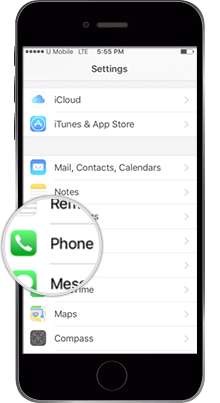
Tap on Phone.
Step 7
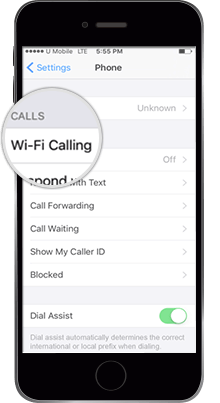
Select Wi-Fi Calling.
Step 8
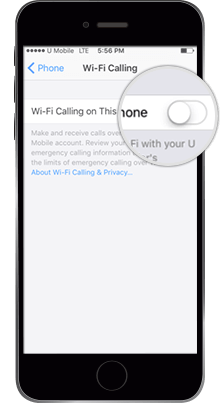
Slide the WiFi is Calling On This Phone to ON.
Step 9
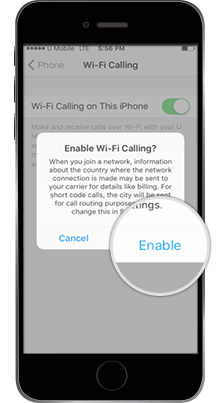
Tap Enable when the Confirmation Message pops up.
Make & Receive Calls with Wi-Fi Calling
Step 1
.png/jcr:content/renditions/cq5dam.web.205.403.webp)
Ensure that WiFi is turned on.
.png/jcr:content/renditions/cq5dam.web.230.403.webp)
Make sure you are connected to a WiFi access point.
Step 3
.png/jcr:content/renditions/cq5dam.web.210.403.webp)
Go back to Home Screen, and you will see ‘U Mobile WiFi’ on the top left.
Step 4
.png/jcr:content/renditions/cq5dam.web.191.403.webp)
To make a WiFi Calling, simply dial a number.
Step 5
.png/jcr:content/renditions/cq5dam.web.191.403.webp)
Incoming calls are automatically received through WiFi.
Enable Wi-Fi Calling
Step 1
.png/jcr:content/renditions/cq5dam.web.204.404.webp)
Update your Android phone software to the latest version.
Step 2
.png/jcr:content/renditions/cq5dam.web.204.404.webp)
SMS 'WiFi calling on' to 28118.
Step 3
.png/jcr:content/renditions/cq5dam.web.212.404.webp)
Tap on Settings and then, tap on WiFi Calling.
Step 4
.png/jcr:content/renditions/cq5dam.web.204.404.webp)
Slide ON WiFi Calling.
Step 5
.png/jcr:content/renditions/cq5dam.web.214.404.webp)
Select WiFi Preferred to make calls using WiFi Calling.
Step 6
.png/jcr:content/renditions/cq5dam.web.204.404.webp)
Turn ON your WiFi.
Step 7
.png/jcr:content/renditions/cq5dam.web.204.404.webp)
Connect to an available WiFi Network.
Make & Receive Calls with Wi-Fi Calling
Step 1
.png/jcr:content/renditions/cq5dam.web.204.415.webp)
Ensure that WiFi is turned ON and WiFi Calling is active.
Step 2
.png/jcr:content/renditions/cq5dam.web.204.404.webp)
To make a call via WiFi Calling,
simply dial a number.
Step 3
.png/jcr:content/renditions/cq5dam.web.204.404.webp)
Incoming calls are automatically
received through WiFi.
Frequently Asked Questions
WiFi Calling allows you to use your existing U Mobile number to make and receive calls using a WiFi connection. Your WiFi hotspot effectively becomes a U Mobile network tower. Enjoy huge savings while overseas when calling Malaysian numbers at a local call rate with no roaming surcharge.
Effective 22 January 2025, VoWiFi is available while roaming in all countries except Myanmar. Calls to Malaysian numbers while in Myanmar will be subjected to roaming surcharges.
Yes, a valid and active U Mobile SIM card is required. If your line is barred, suspended or terminated, you will not be able to make a call. If you have a dual-SIM phone, please insert your U Mobile SIM into Slot 1.
All U Mobile subscribers on postpaid and prepaid plans are eligible for WiFi Calling, as long as your rate plan supports “voice call”. It is not available for “data only” plans such as Postpaid MB.
Get in Touch with Us Today!

Speak to our representative

Contact Us