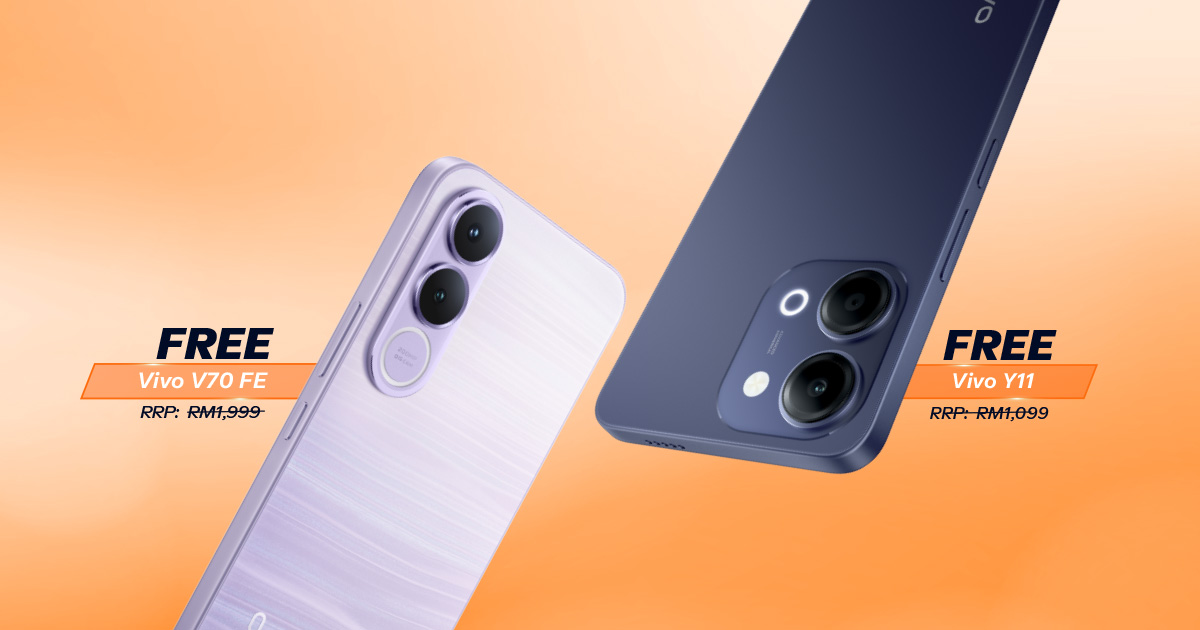
{{deviceBrand}}
{{deviceModel}}

{{submittedDetailsLabel}}
- {{interestedInLabel}}
- {{data.find(item => item.fieldName === 'IM_INTERESTED_IN' ).fieldValue}}
- {{salutationLabel}}
- {{data.find(item => item.fieldName === 'SALUTATION' ).fieldValue}}
- {{fullNameLabel}}
- {{data.find(item => item.fieldName === 'NAME' ).fieldValue}}
- {{idTypeLabel}}
- {{data.find(item => item.fieldName === 'ID_TYPE' ).fieldValue}}
- {{idNumberLabel}}
- {{data.find(item => item.fieldName === 'ID_NO' ).fieldValue}}
- {{mobileNumberLabel}}
- {{data.find(item => item.fieldName === 'PHONE_NO' ).fieldValue}}
- {{emailAddressLabel}}
- {{data.find(item => item.fieldName === 'EMAIL' ).fieldValue}}
- {{adresssLineLabel}}
- {{data.find(item => item.fieldName === 'ADDRESS_LINE' ).fieldValue}}
- {{postcodeLabel}}
- {{data.find(item => item.fieldName === 'POSTCODE' ).fieldValue}}
- {{stateLabel}}
- {{data.find(item => item.fieldName === 'STATE' ).fieldValue}}
- {{cityLabel}}
- {{data.find(item => item.fieldName === 'CITY' ).fieldValue}}
{{yourSelectedPlanLabel}}
- {{broadbandPlanLabel}}
- {{data.find(item => item.fieldName === 'BROADBAND_PLAN' )?.fieldValue}}
- {{selectedPostpaidOptionPlanLabel}}
- {{selectedPostpaidOptionPlan}}
- {{monthlyFeeLabel}}
- {{data.find(item => item.fieldName === 'MONTHLY_FEE' )?.fieldValue}}
{{personalDetailsFormLabel}}
- {{salutationLabel}}
- {{data.find(item => item.fieldName === 'SALUTATION' )?.fieldValue}}
- {{fullNameLabel}}
- {{data.find(item => item.fieldName === 'NAME' )?.fieldValue}}
- {{idTypeLabel}}
- {{data.find(item => item.fieldName === 'ID_TYPE' )?.fieldValue}}
- {{idNumberLabel}}
- {{data.find(item => item.fieldName === 'ID_NO' )?.fieldValue}}
- {{mobileNumberLabel}}
- {{data.find(item => item.fieldName === 'PHONE_NO' )?.fieldValue}}
- {{emailAddressLabel}}
- {{data.find(item => item.fieldName === 'EMAIL' )?.fieldValue}}
{{installationAddressFormLabel}}
- {{installationBuildingNameLabel}}
- {{data.find(item => item.fieldName === 'INSTALLATION_BUILDING_NAME' )?.fieldValue}}
- {{installationUnitBlockLabel}}
- {{data.find(item => item.fieldName === 'INSTALLATION_BLOCK_NUMBER' )?.fieldValue}}
- {{installationUnitNumberLabel}}
- {{data.find(item => item.fieldName === 'INSTALLATION_UNIT_NUMBER' )?.fieldValue}}
- {{installationAddressLineLabel}}
- {{data.find(item => item.fieldName === 'INSTALLATION_ADDRESS_LINE' )?.fieldValue}}
- {{installationPostcodeLabel}}
- {{data.find(item => item.fieldName === 'INSTALLATION_POSTCODE' )?.fieldValue}}
- {{installationStateLabel}}
- {{data.find(item => item.fieldName === 'INSTALLATION_STATE' )?.fieldValue}}
- {{installationCityLabel}}
- {{data.find(item => item.fieldName === 'INSTALLATION_CITY' )?.fieldValue}}
- {{installationServiceProviderLabel}}
- {{data.find(item => item.fieldName === 'SERVICE_PROVIDER' )?.fieldValue}}
{{registrationAddressFormLabel}}
- {{registrationBuildingNameLabel}}
- {{data.find(item => item.fieldName === 'REGISTRATION_BUILDING_NAME' )?.fieldValue}}
- {{registrationUnitBlockLabel}}
- {{data.find(item => item.fieldName === 'REGISTRATION_BLOCK_NUMBER' )?.fieldValue}}
- {{registrationUnitNumberLabel}}
- {{data.find(item => item.fieldName === 'REGISTRATION_UNIT_NUMBER' )?.fieldValue}}
- {{registrationAddressLineLabel}}
- {{data.find(item => item.fieldName === 'REGISTRATION_ADDRESS_LINE' )?.fieldValue}}
- {{registrationPostcodeLabel}}
- {{data.find(item => item.fieldName === 'REGISTRATION_POSTCODE' )?.fieldValue}}
- {{registrationStateLabel}}
- {{data.find(item => item.fieldName === 'REGISTRATION_STATE' )?.fieldValue}}
- {{registrationCityLabel}}
- {{data.find(item => item.fieldName === 'REGISTRATION_CITY' )?.fieldValue}}
- {{registrationServiceProviderLabel}}
- {{data.find(item => item.fieldName === 'SERVICE_PROVIDER' )?.fieldValue}}
All Your Lines in 1
Tracking & managing your lines made easy.
Streamlined Login Experience
Access multiple applications and systems with just one set of login credentials.
Centralised Line Management
Manage all your lines under your NRIC and perform actions like paying bills, topping up, redeeming rewards, and more.
Convenient Account Switching
Easily track your activities, purchases, and usage across all lines.
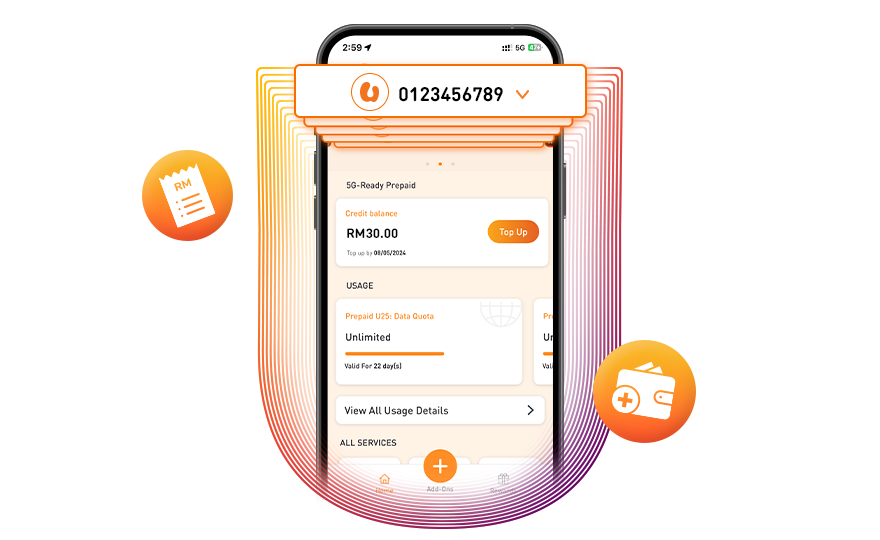
绑定账户实现无缝账户管理
只需在 MyUMobile App 将注册在您身份 ID 下的手机线相互链接后,便可以随时切换至任何的手机线以完成账单支付或加额等操作。
还不是 U Mobile 用户?绑定账户之前,请通过 MyUMobile App 或网店创建户口。
将您所有的手机线集中管理
轻松跟进和管理您的手机线
简化登录流程
只需一套登录凭证即可使用我们的多个平台和系统。
集中管理多条手机线
管理注册在您身份 ID下的所有手机线,并执行支付账单、加额、领取奖励等操作。
便捷切换账户
轻松跟进您所有手机线上的活动、购买和使用情况。
按照以下步骤开始绑定账户
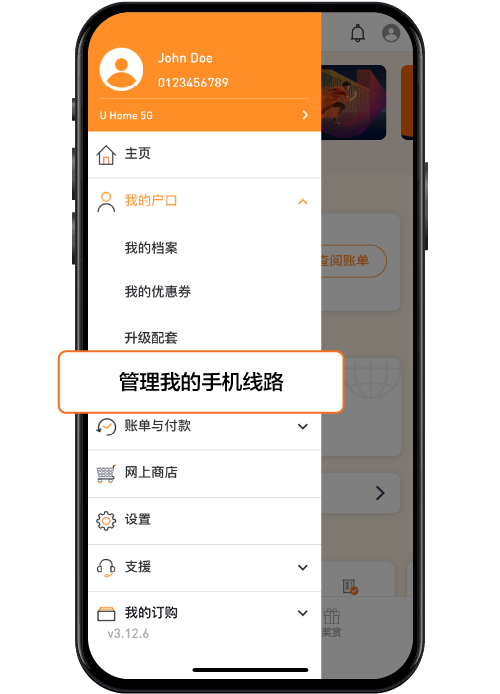
步骤 1
登录 MyUMobile App,导航至主菜单,然后单击“我的户口”下的“管理我的帐户”。
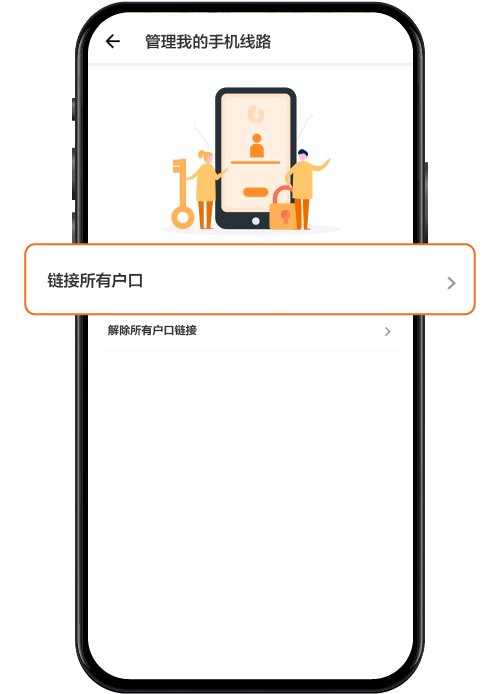
步骤 2
点击 "链接我的所有帐户",然后填写与 U Mobile 手机或宽频配套相关的详细信息。
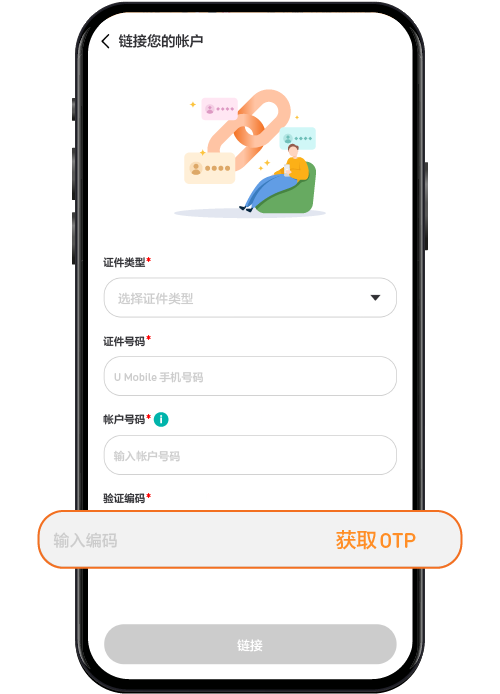
步骤 3
填写必要的详细信息并完成 OTP 验证,即可成功链接所有帐户。
通过这些简单的步骤在不同账户间切换
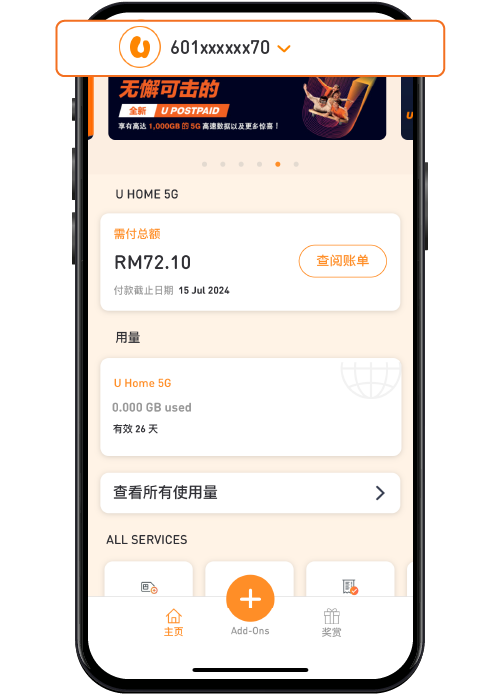
步骤 2: 选择首选手机号码
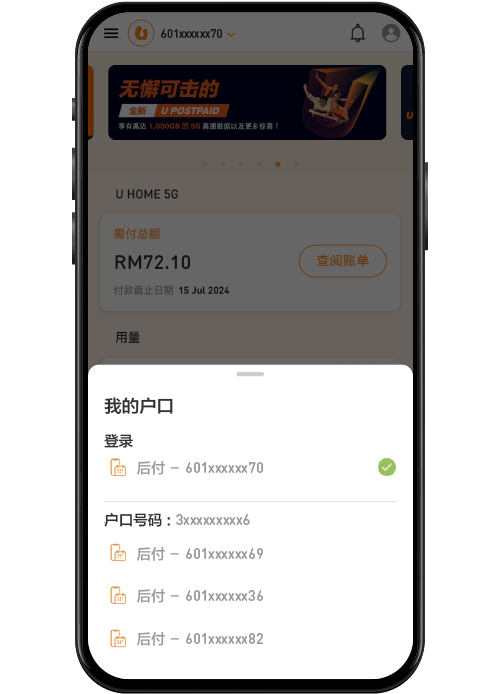
您的链接帐户菜单将出现,然后点击您要查看和管理的手机线。
步骤 3: 成功切换帐户
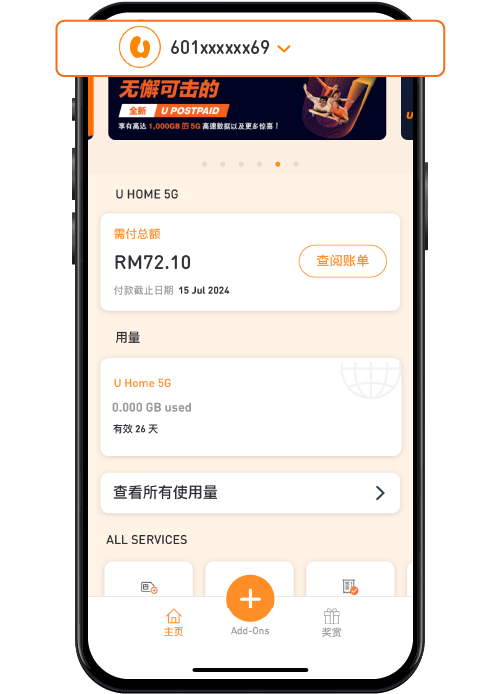
您的帐户将自动切换,便于帐户管理。
更多联系方式
无论是通过 MyUMobile App 还是社交媒体,都能快速便捷的联系我们。
MyUMobile App
通过 MyUMobile App联系我们。

通过FB Messenger留下您的信息。

Instagram
有疑问吗?请随时私信我们!
常见问题
是的,在您完成了 Q5 中的步骤之后,只要您之前登录过并验证了手机号码。如果您没有完成 Q5 中的步骤,您可以随时使用您选择的手机号码和一次性密码(OTP)登录,但您只能查看您自己的相关信息。
可以。
可以。但如果您不是 U Mobile 用户,当您登录 App 时,系统会提示您前往网店进行登录。但如果您是 U Mobile 用户,您可以登录App 并被引导到主页。