{{deviceBrand}}
{{deviceModel}}

{{submittedDetailsLabel}}
- {{interestedInLabel}}
- {{data.find(item => item.fieldName === 'IM_INTERESTED_IN' ).fieldValue}}
- {{salutationLabel}}
- {{data.find(item => item.fieldName === 'SALUTATION' ).fieldValue}}
- {{fullNameLabel}}
- {{data.find(item => item.fieldName === 'NAME' ).fieldValue}}
- {{idTypeLabel}}
- {{data.find(item => item.fieldName === 'ID_TYPE' ).fieldValue}}
- {{idNumberLabel}}
- {{data.find(item => item.fieldName === 'ID_NO' ).fieldValue}}
- {{mobileNumberLabel}}
- {{data.find(item => item.fieldName === 'PHONE_NO' ).fieldValue}}
- {{emailAddressLabel}}
- {{data.find(item => item.fieldName === 'EMAIL' ).fieldValue}}
- {{adresssLineLabel}}
- {{data.find(item => item.fieldName === 'ADDRESS_LINE' ).fieldValue}}
- {{postcodeLabel}}
- {{data.find(item => item.fieldName === 'POSTCODE' ).fieldValue}}
- {{stateLabel}}
- {{data.find(item => item.fieldName === 'STATE' ).fieldValue}}
- {{cityLabel}}
- {{data.find(item => item.fieldName === 'CITY' ).fieldValue}}
{{yourSelectedPlanLabel}}
- {{broadbandPlanLabel}}
- {{data.find(item => item.fieldName === 'BROADBAND_PLAN' )?.fieldValue}}
- {{selectedPostpaidOptionPlanLabel}}
- {{selectedPostpaidOptionPlan}}
- {{monthlyFeeLabel}}
- {{data.find(item => item.fieldName === 'MONTHLY_FEE' )?.fieldValue}}
{{personalDetailsFormLabel}}
- {{salutationLabel}}
- {{data.find(item => item.fieldName === 'SALUTATION' )?.fieldValue}}
- {{fullNameLabel}}
- {{data.find(item => item.fieldName === 'NAME' )?.fieldValue}}
- {{idTypeLabel}}
- {{data.find(item => item.fieldName === 'ID_TYPE' )?.fieldValue}}
- {{idNumberLabel}}
- {{data.find(item => item.fieldName === 'ID_NO' )?.fieldValue}}
- {{mobileNumberLabel}}
- {{data.find(item => item.fieldName === 'PHONE_NO' )?.fieldValue}}
- {{emailAddressLabel}}
- {{data.find(item => item.fieldName === 'EMAIL' )?.fieldValue}}
{{installationAddressFormLabel}}
- {{installationBuildingNameLabel}}
- {{data.find(item => item.fieldName === 'INSTALLATION_BUILDING_NAME' )?.fieldValue}}
- {{installationUnitBlockLabel}}
- {{data.find(item => item.fieldName === 'INSTALLATION_BLOCK_NUMBER' )?.fieldValue}}
- {{installationUnitNumberLabel}}
- {{data.find(item => item.fieldName === 'INSTALLATION_UNIT_NUMBER' )?.fieldValue}}
- {{installationAddressLineLabel}}
- {{data.find(item => item.fieldName === 'INSTALLATION_ADDRESS_LINE' )?.fieldValue}}
- {{installationPostcodeLabel}}
- {{data.find(item => item.fieldName === 'INSTALLATION_POSTCODE' )?.fieldValue}}
- {{installationStateLabel}}
- {{data.find(item => item.fieldName === 'INSTALLATION_STATE' )?.fieldValue}}
- {{installationCityLabel}}
- {{data.find(item => item.fieldName === 'INSTALLATION_CITY' )?.fieldValue}}
- {{installationServiceProviderLabel}}
- {{data.find(item => item.fieldName === 'SERVICE_PROVIDER' )?.fieldValue}}
{{registrationAddressFormLabel}}
- {{registrationBuildingNameLabel}}
- {{data.find(item => item.fieldName === 'REGISTRATION_BUILDING_NAME' )?.fieldValue}}
- {{registrationUnitBlockLabel}}
- {{data.find(item => item.fieldName === 'REGISTRATION_BLOCK_NUMBER' )?.fieldValue}}
- {{registrationUnitNumberLabel}}
- {{data.find(item => item.fieldName === 'REGISTRATION_UNIT_NUMBER' )?.fieldValue}}
- {{registrationAddressLineLabel}}
- {{data.find(item => item.fieldName === 'REGISTRATION_ADDRESS_LINE' )?.fieldValue}}
- {{registrationPostcodeLabel}}
- {{data.find(item => item.fieldName === 'REGISTRATION_POSTCODE' )?.fieldValue}}
- {{registrationStateLabel}}
- {{data.find(item => item.fieldName === 'REGISTRATION_STATE' )?.fieldValue}}
- {{registrationCityLabel}}
- {{data.find(item => item.fieldName === 'REGISTRATION_CITY' )?.fieldValue}}
- {{registrationServiceProviderLabel}}
- {{data.find(item => item.fieldName === 'SERVICE_PROVIDER' )?.fieldValue}}
Start Your U Prepaid Journey Today!

Simple & Easy
Just follow the easy steps below and get your SIM activated in no time.

Speedy Activation
Paperless and instantaneous process that saves your time!

Accessible Anywhere
Get it done anytime as long as you have an active Internet connection.
Follow these Simple Steps and U Are Good to Go!
Step 1
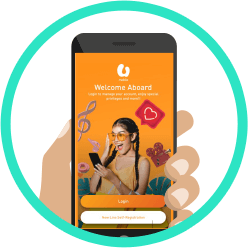
Launch the MyUMobile App and tap on New Line Self-Registration.
Launch the MyUMobile App and tap on New Line Self-Registration.
Step 2
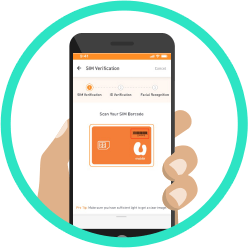
Please scan your SIM barcode.
Step 3
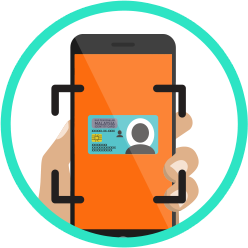
Snap a photo of your ID.
Malaysians: MyKad/ MyTentera
Non-Malaysians: MyPR/ MyKas/ International Passport/ IMM13.

Step 4
Tap the camera icon to scan your face.
Step 5
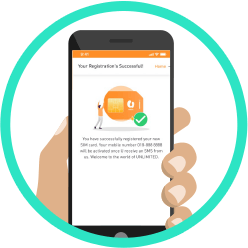
Your SIM pack is now successfully registered! U will receive a notification to confirm your activation.
Or Watch this Video Guide on How to Activate Your SIM!

Switch to U
Enjoy more awesome perks and rebates when you Switch to U!
Get MyUMobile App Now!
Enjoy a better, faster and safer experience today!
Frequently Asked Questions
U Mobile Self-Registration is a fast and easy digital onboarding process through self-verification or electronic Know Your Customer (eKYC) face recognition, information and document validations via MyUMobile AppMyUMobile App. The process is contactless and secure as all other registration forms.
Getting Started.
- Get your smartphone camera ready.
- Get connected to WiFi hotspot
- Download the MyUMobile AppMyUMobile App from Google Play Store, Apple App Store or Huawei App Gallery directly or by scanning the QR code on your U Mobile Starter pack to download the App.
Self-register your SIM card
Launch MyUMobile AppMyUMobile App and choose “New Line Self-Registration” and follow these steps:
- Scan SIM barcode on top right corner of your SIM card to validate the SIM.
- Scan ID Document to verify your identity details.
- Facial recognition to match your ID.
Identity Document.
- For Malaysian – MyKad or MyTentera
- For Foreigners – International Passport or MyKAS or MyPR or IMM13
Please ensure that your ID used is valid, original and in good condition.
In addition, we also verify your identity through facial recognition.